R3nzSkin - Ultimate League of Legends Skin Changer

Transform your League of Legends experience with the most advanced and feature-rich skin changer available

What is R3nzSkin?

R3nzSkin is a powerful and sophisticated internal skin changer designed specifically for League of Legends players who want to customize their gaming experience. As the most advanced skin modification tool available, R3nzSkin allows you to change the appearance of your champion skins, ward skins, and even the skins of other in-game elements such as towers, minions, and jungle monsters. Unlike external modification tools, R3nzSkin works seamlessly within the game environment, providing a smooth and integrated experience.

Developed with cutting-edge technology and built using C++ programming language, R3nzSkin offers unparalleled performance and reliability. The tool features an intuitive in-game configuration interface powered by ImGui, making it easy for both beginners and advanced users to customize their League of Legends visual experience. Whether you're looking to try out premium skins before purchasing them, showcase rare limited-edition skins, or simply enjoy visual variety during your gaming sessions, R3nzSkin provides the perfect solution.
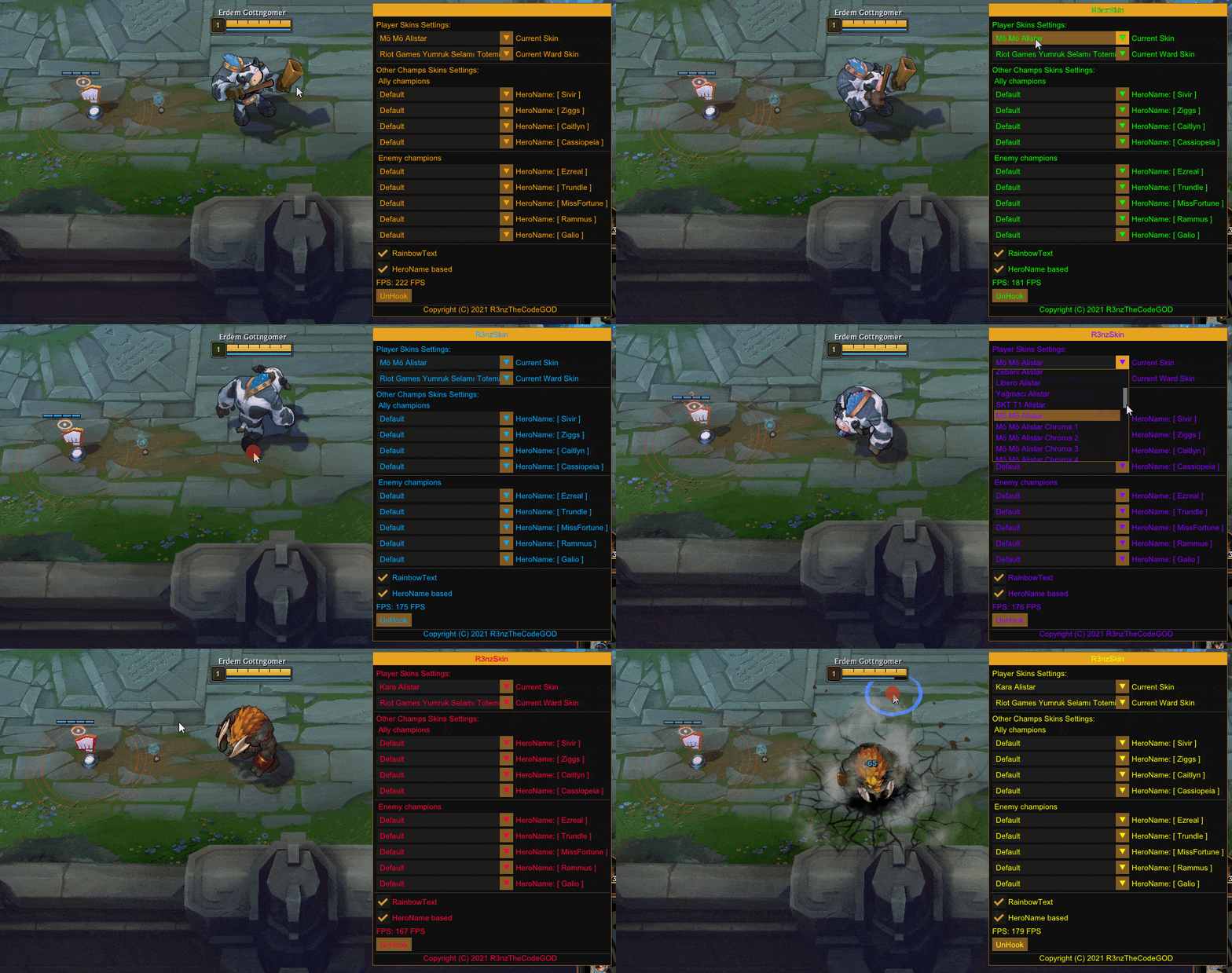
R3nzSkin in action

The software has been carefully engineered to provide maximum compatibility and stability. With support for all popular languages worldwide, R3nzSkin ensures that players from different regions can use the tool in their preferred language. The automatic skin database update feature means you'll always have access to the latest champion skins released by Riot Games, without needing to manually download updates or patches.

⚠ Important Notice

Please note that R3nzSkin is no longer supported due to Riot Games implementing Valorant's Vanguard anti-cheat system to League of Legends. This tool is provided for educational and archival purposes. Use at your own discretion and risk.

Powerful Features That Set R3nzSkin Apart

Discover why thousands of League of Legends players choose R3nzSkin for their customization needs

🎨

Complete Skin Customization

Change the appearance of your champion, ward, other champions, towers, minions, and jungle monsters all in one place. Total control over your visual experience.

🔄

Automatic Database Updates

Stay current with the latest skins automatically. Our intelligent update system ensures you always have access to newly released skins without manual intervention.

👁

Spectator Mode Support

Full compatibility with League of Legends spectator mode, allowing you to customize your viewing experience while watching professional matches or friends' games.

⚡

Unlimited Skin Changes

Change skins as many times as you want during a single game. No restrictions, no cooldowns - switch between different skins whenever you feel like it.

🌍

Multi-Language Support

Available in all popular languages worldwide. Whether you speak English, Spanish, Korean, Chinese, or any other major language, R3nzSkin supports your preference.

⚙

In-Game Configuration

Easy-to-use in-game menu powered by ImGui technology. Configure all settings without leaving your match, with an intuitive and responsive interface.

💾

JSON Configuration Saving

Save and load your favorite skin configurations with JSON-based settings. Create multiple profiles for different moods or champions and switch between them effortlessly.

🚀

High Performance

Optimized for minimal impact on game performance. Built with SSE2 instructions and optional AVX/AVX2/AVX-512 support for maximum efficiency on modern processors.

🔒

Internal Implementation

Works as an internal modification, providing better integration with the game client and more reliable operation compared to external modification tools.

How R3nzSkin Works

Understanding how R3nzSkin operates will help you get the most out of this powerful customization tool. The software uses advanced internal modification techniques to seamlessly integrate with League of Legends, providing a smooth and responsive skin-changing experience.

🔧 Technical Architecture

R3nzSkin is built using modern C++ programming language, ensuring excellent performance and low memory footprint. The tool operates by injecting a Dynamic Link Library (DLL) into the League of Legends game process, allowing it to modify skin textures and models in real-time. This internal approach means that skin changes happen instantly and are only visible on your client - other players in the game will continue to see the default skins.

📦 Installation and Setup

Getting started with R3nzSkin is straightforward and user-friendly. After downloading the software package from our website, you'll receive both the main DLL file and the R3nzSkin_Injector.exe application. The injector tool handles the process of loading the skin changer into your game, with an easy-to-use interface that requires minimal technical knowledge. Simply run the injector while your game is active, and the tool will automatically integrate with League of Legends.

🎮 Using R3nzSkin In-Game

Once R3nzSkin is successfully injected, using it during your matches is incredibly simple. Press the Insert key on your keyboard to bring up the R3nzSkin menu interface. This elegant, ImGui-powered menu appears as an overlay within your game, allowing you to browse through all available skins for your current champion and other game elements. The interface is designed to be non-intrusive, with adjustable transparency and positioning options to ensure it doesn't interfere with your gameplay.

⚙ Configuration Options

R3nzSkin provides extensive configuration capabilities through its JSON-based settings system. You can save your preferred skin choices for each champion, ward type, and other game elements, creating personalized profiles that load automatically. The configuration files are human-readable and can be edited manually if you prefer, offering advanced users the flexibility to fine-tune every aspect of their setup.

🔄 Automatic Updates

One of R3nzSkin's standout features is its automatic skin database updating system. Whenever Riot Games releases new champion skins or visual updates, R3nzSkin's database automatically refreshes to include these additions. This means you don't need to constantly download new versions of the software or manually update skin files - everything happens seamlessly in the background.

Why Choose R3nzSkin Over Other Skin Changers?

The League of Legends customization landscape includes various skin modification tools, but R3nzSkin stands out from the competition through its superior feature set, reliability, and user experience. Here's what makes R3nzSkin the preferred choice for thousands of players worldwide:

✨ Superior Stability and Reliability

Built upon the foundation of the well-respected LeagueSkinChanger project by B3akers, R3nzSkin represents an improved and updated version with enhanced stability features. The development team has invested significant effort into ensuring that the tool operates smoothly across different game patches and system configurations. Extensive testing and optimization mean fewer crashes and a more dependable experience.

🎯 Active Development and Community

R3nzSkin benefits from an active development cycle and engaged community of users. Regular updates address compatibility issues with new League of Legends patches, implement user-requested features, and improve overall performance. The project's open-source nature on GitHub means that transparency is built into the development process, and users can contribute improvements or report issues directly.

💡 User-Friendly Design

While many skin changers require complex setup procedures or technical expertise, R3nzSkin prioritizes accessibility. The included injector application streamlines the injection process, while the in-game menu provides an intuitive interface that anyone can master within minutes. Comprehensive documentation and clear instructions ensure that even first-time users can get up and running quickly.

🌟 Comprehensive Feature Set

From champion skins to ward skins, from towers to jungle monsters, R3nzSkin offers complete customization coverage. The ability to change skins multiple times per game, support for spectator mode, and multi-language capabilities create a feature package that exceeds what most competing tools provide. This comprehensive approach means you only need one tool for all your League of Legends customization needs.

System Requirements

R3nzSkin is designed to work efficiently on most modern Windows systems. Here are the requirements to ensure optimal performance:

Minimum Requirements

  • Operating System: Windows 7 or newer (Windows 10/11 recommended)
  • Architecture: 64-bit (x64) system required
  • RAM: 4GB minimum (8GB recommended)
  • League of Legends: Latest version installed
  • Administrator privileges may be required for injection

Recommended Specifications

  • Operating System: Windows 10 or Windows 11
  • Processor: CPU with AVX2 support for optimal performance
  • RAM: 8GB or more
  • Storage: 100MB free space for software and configurations
  • Anti-virus: Configured to allow R3nzSkin (may require exclusions)

💡 Performance Tip

If your CPU supports AVX, AVX2, or AVX-512 instruction sets, you can enable these in the build settings for enhanced performance. The default build uses SSE2 instructions for broad compatibility.

Frequently Asked Questions

Find answers to common questions about R3nzSkin

What is R3nzSkin and how does it work? ▼

R3nzSkin is an internal skin changer for League of Legends that allows you to modify the appearance of champion skins, wards, towers, minions, and jungle monsters in your game client. It works by injecting a DLL into the League of Legends process, enabling real-time skin modifications that are visible only to you.

Is R3nzSkin free to use? ▼

Yes, R3nzSkin is completely free and open-source software. You can download it from our website or compile it yourself from the source code. There are no hidden fees, premium features, or subscription costs.

Can other players see the skins I'm using with R3nzSkin? ▼

No, the skin changes made by R3nzSkin are client-side only, meaning they are visible exclusively on your screen. Other players in your game will see the default skins you actually own. This is a visual modification tool for your personal gaming experience.

How do I use R3nzSkin during a game? ▼

After injecting R3nzSkin using the provided injector tool, simply press the Insert key on your keyboard while in-game to open the R3nzSkin menu. From there, you can select skins for your champion, wards, and other game elements. You can change skins multiple times during a single match.

Why does R3nzSkin require administrator privileges? ▼

Administrator privileges may be needed for the injector to successfully inject the DLL into the League of Legends game process. This is a standard requirement for internal modification tools. If injection fails without admin rights, try running the injector as administrator.

Does R3nzSkin work with the latest League of Legends patch? ▼

R3nzSkin features automatic skin database updates, so it typically works with new patches. However, please note that R3nzSkin is no longer actively supported due to Riot's implementation of Vanguard anti-cheat. The tool is provided as-is for educational purposes.

Can I use R3nzSkin in spectator mode? ▼

Yes, R3nzSkin fully supports spectator mode. You can customize the appearance of champions and other game elements while watching matches, making your viewing experience more enjoyable and personalized.

My antivirus is flagging R3nzSkin as suspicious. Is it safe? ▼

Antivirus software often flags game modification tools due to their injection mechanisms, even when they're safe. R3nzSkin is open-source, and you can review the code yourself on GitHub. You may need to add an exception in your antivirus settings to use the tool. Always download from official sources.

Can I save my favorite skin configurations? ▼

Absolutely! R3nzSkin uses a JSON-based configuration system that automatically saves your skin preferences. You can create multiple configuration profiles and load them as needed, making it easy to switch between different setups.

Where can I get help if I encounter issues? ▼

You can reach out through our contact page for support. Additionally, the R3nzSkin community and documentation provide troubleshooting guides for common issues. Make sure you're using the latest version and have met all system requirements.

Ready to Transform Your League of Legends Experience?

Download R3nzSkin today and unlock unlimited skin customization possibilities. Join thousands of players who have enhanced their gaming experience with the most advanced skin changer available.